ChatGPT、Codex中转站 注册送5刀,秒用GPT5.5模型。地址:https://lun.pw/
今天抖音上偶然刷到的,真是不错,自己也试着开发了一下。
预览
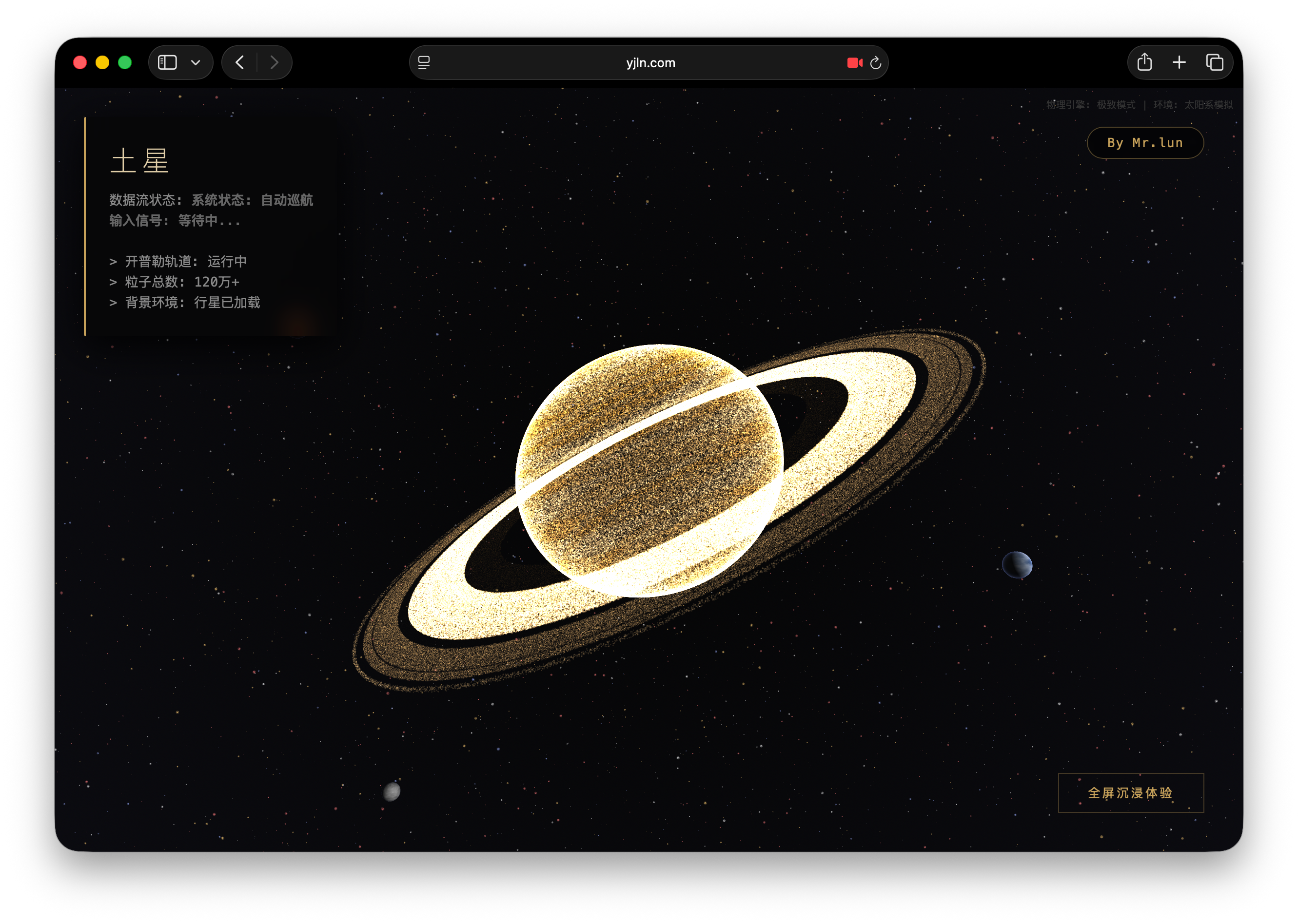
在线体验
体验地址 请戳👇 强烈建议使用电脑体验,手机非常卡顿!
https://www.yjln.com/shareCode/TuXingLiZi.html
测试机器:M4 Pro 48G(最完美)、M4 16G(流畅)、iPhone 17 Pro (卡顿)
源代码
如果你的设备比较老旧,可以修改代码第511行,减少粒子的数量即可。
const particleCount = 1200000; // 粒子总数:120万代码:
<!DOCTYPE html>
<html lang="zh-CN">
<head>
<meta charset="UTF-8">
<meta name="viewport" content="width=device-width, initial-scale=1.0">
<title>粒子土星</title>
<script src="https://cdnjs.cloudflare.com/ajax/libs/three.js/r128/three.min.js"></script>
<script src="https://cdn.jsdelivr.net/npm/@mediapipe/camera_utils/camera_utils.js" crossorigin="anonymous"></script>
<script src="https://cdn.jsdelivr.net/npm/@mediapipe/control_utils/control_utils.js" crossorigin="anonymous"></script>
<script src="https://cdn.jsdelivr.net/npm/@mediapipe/drawing_utils/drawing_utils.js" crossorigin="anonymous"></script>
<script src="https://cdn.jsdelivr.net/npm/@mediapipe/hands/hands.js" crossorigin="anonymous"></script>
<style>
body {
margin: 0;
overflow: hidden;
background-color: #000;
font-family: 'Microsoft YaHei', 'Segoe UI', sans-serif; /* 增加中文字体支持 */
color: white;
}
#canvas-container {
width: 100vw;
height: 100vh;
position: absolute;
top: 0;
left: 0;
z-index: 1;
/* 极度深邃的宇宙背景,微弱的径向光晕 */
background: radial-gradient(circle at center, #050505 0%, #0b0b10 100%);
}
#ui-layer {
position: absolute;
top: 30px;
left: 30px;
z-index: 10;
pointer-events: none;
}
.glass-panel {
background: rgba(5, 5, 5, 0.7);
backdrop-filter: blur(12px);
padding: 24px;
border-radius: 2px;
border-left: 2px solid #c5a059;
box-shadow: 0 10px 40px rgba(0, 0, 0, 0.9);
max-width: 280px;
}
h1 {
font-weight: 200;
font-size: 1.8rem;
margin: 0 0 10px 0;
color: #e0cda7;
letter-spacing: 4px;
text-transform: uppercase;
}
.status-text {
font-size: 0.85rem; /* 稍微调大一点适应中文 */
color: #888;
line-height: 1.6;
font-family: monospace;
}
.highlight {
color: #c5a059;
font-weight: bold;
}
#controls {
position: absolute;
bottom: 40px;
right: 40px;
z-index: 10;
pointer-events: auto;
}
/* 作者个人网站悬浮按钮 */
#author-btn {
position: absolute;
top: 40px;
right: 40px;
z-index: 20;
pointer-events: auto;
text-decoration: none;
color: #c5a059;
border: 1px solid rgba(197, 160, 89, 0.4);
background: rgba(0, 0, 0, 0.6);
padding: 8px 20px;
font-size: 0.8rem;
border-radius: 20px;
transition: all 0.3s ease;
backdrop-filter: blur(4px);
letter-spacing: 1px;
font-family: monospace;
}
#author-btn:hover {
background: #c5a059;
color: #000;
box-shadow: 0 0 15px rgba(197, 160, 89, 0.4);
}
button {
background: transparent;
border: 1px solid rgba(197, 160, 89, 0.3);
color: #c5a059;
padding: 12px 30px;
font-size: 0.8rem;
cursor: pointer;
transition: all 0.4s ease;
text-transform: uppercase;
letter-spacing: 2px;
}
button:hover {
background: rgba(197, 160, 89, 0.1);
border-color: #c5a059;
box-shadow: 0 0 15px rgba(197, 160, 89, 0.2);
}
#loading {
position: absolute;
top: 50%;
left: 50%;
transform: translate(-50%, -50%);
z-index: 20;
text-align: center;
color: #444;
font-size: 0.8rem;
letter-spacing: 3px;
text-transform: uppercase;
}
#fps-counter {
position: absolute;
top: 10px;
right: 10px;
color: #333;
font-family: monospace;
font-size: 10px;
z-index: 5;
}
.input_video { display: none; }
</style>
</head>
<body>
<video class="input_video"></video>
<!-- 作者跳转按钮 -->
<a id="author-btn" href="https://www.yjln.com" target="_blank">By Mr.lun</a>
<div id="fps-counter">物理引擎: 极致模式 | 环境: 太阳系模拟</div>
<div id="loading">
正在构建百万粒子与行星数据...
</div>
<div id="ui-layer">
<div class="glass-panel">
<h1>土星</h1>
<div class="status-text">
数据流状态: <span id="status-indicator" class="highlight">待机</span>
<br><br>
> 开普勒轨道: 运行中<br>
> 粒子总数: 120万+<br>
> 背景环境: 行星已加载
</div>
</div>
</div>
<div id="controls">
<button onclick="toggleFullScreen()">全屏沉浸体验</button>
</div>
<div id="canvas-container"></div>
<!-- 1. 土星 顶点着色器 (处理粒子位置/大小/噪点) -->
<script type="x-shader/x-vertex" id="vertexshader">
attribute float size;
attribute vec3 customColor;
attribute float opacityAttr;
attribute float orbitSpeed;
attribute float isRing;
attribute float aRandomId;
varying vec3 vColor;
varying float vDist;
varying float vOpacity;
varying float vScaleFactor;
varying float vIsRing;
uniform float uTime;
uniform float uScale;
uniform float uRotationX;
// 2D 旋转矩阵
mat2 rotate2d(float _angle){
return mat2(cos(_angle),-sin(_angle),
sin(_angle),cos(_angle));
}
// 简单的哈希函数,用来做随机
float hash(float n) { return fract(sin(n) * 43758.5453123); }
void main() {
// 根据缩放级别做 LOD (细节层次) 剔除,离得远就不渲染那么多点
float normScaleLOD = clamp((uScale - 0.15) / 2.35, 0.0, 1.0);
float visibilityThreshold = 0.9 + pow(normScaleLOD, 1.2) * 0.1;
// 如果随机ID大于阈值,直接把点扔出屏幕,省显卡资源
if (aRandomId > visibilityThreshold) {
gl_Position = vec4(0.0);
gl_PointSize = 0.0;
return;
}
vec3 pos = position;
// 让光环和本体分开旋转,增加动态感
if (isRing > 0.5) {
float angleOffset = uTime * orbitSpeed * 0.2;
vec2 rotatedXZ = rotate2d(angleOffset) * pos.xz;
pos.x = rotatedXZ.x;
pos.z = rotatedXZ.y;
} else {
float bodyAngle = uTime * 0.03;
vec2 rotatedXZ = rotate2d(bodyAngle) * pos.xz;
pos.x = rotatedXZ.x;
pos.z = rotatedXZ.y;
}
// 处理整体视角的 X 轴旋转(即手势控制的俯仰角)
float cx = cos(uRotationX);
float sx = sin(uRotationX);
float ry = pos.y * cx - pos.z * sx;
float rz = pos.y * sx + pos.z * cx;
pos.y = ry;
pos.z = rz;
// 转换到相机空间
vec4 mvPosition = modelViewMatrix * vec4(pos * uScale, 1.0);
float dist = -mvPosition.z;
vDist = dist;
// --- 混沌噪点效果 ---
// 当摄像机贴得很近时,让粒子位置产生抖动,模拟气体湍流
float chaosThreshold = 25.0;
if (dist < chaosThreshold && dist > 0.1) {
float chaosIntensity = 1.0 - (dist / chaosThreshold);
chaosIntensity = pow(chaosIntensity, 3.0);
float highFreqTime = uTime * 40.0;
float noiseX = sin(highFreqTime + pos.x * 10.0) * hash(pos.y);
float noiseY = cos(highFreqTime + pos.y * 10.0) * hash(pos.x);
float noiseZ = sin(highFreqTime * 0.5) * hash(pos.z);
vec3 noiseVec = vec3(noiseX, noiseY, noiseZ) * chaosIntensity * 3.0;
mvPosition.xyz += noiseVec;
}
gl_Position = projectionMatrix * mvPosition;
// 根据距离计算粒子大小 (透视投影)
float pointSize = size * (350.0 / dist);
pointSize *= 0.55;
// 近距离观察行星本体时,稍微把点变小一点,看起来更细腻
if (isRing < 0.5 && dist < 50.0) {
pointSize *= 0.8;
}
gl_PointSize = clamp(pointSize, 0.0, 300.0);
// 传递数据给片元着色器
vColor = customColor;
vOpacity = opacityAttr;
vScaleFactor = uScale;
vIsRing = isRing;
}
</script>
<!-- 2. 土星 片元着色器 (处理颜色/光晕/材质) -->
<script type="x-shader/x-fragment" id="fragmentshader">
varying vec3 vColor;
varying float vDist;
varying float vOpacity;
varying float vScaleFactor;
varying float vIsRing;
void main() {
// 把方形的点变成圆的
vec2 cxy = 2.0 * gl_PointCoord - 1.0;
float r = dot(cxy, cxy);
if (r > 1.0) discard;
// 边缘羽化,做成光球的效果
float glow = smoothstep(1.0, 0.4, r);
// 根据缩放比例计算一个过渡值
float t = clamp((vScaleFactor - 0.15) / 2.35, 0.0, 1.0);
// 颜色混合逻辑:放大时偏向原色,缩小时偏向深金色
vec3 deepGold = vec3(0.35, 0.22, 0.05);
float colorMix = smoothstep(0.1, 0.9, t);
vec3 baseColor = mix(deepGold, vColor, colorMix);
float brightness = 0.2 + 1.0 * t;
// 密度透明度调整
float densityAlpha = 0.25 + 0.45 * smoothstep(0.0, 0.5, t);
vec3 finalColor = baseColor * brightness;
// --- 近距离纹理增强 ---
if (vDist < 40.0) {
float closeMix = 1.0 - (vDist / 40.0);
if (vIsRing < 0.5) {
// 行星本体:增加一点对比度和深色纹理
vec3 deepTexture = pow(vColor, vec3(1.4)) * 1.5;
finalColor = mix(finalColor, deepTexture, closeMix * 0.8);
} else {
// 光环:增加一点尘埃感
finalColor += vec3(0.15, 0.12, 0.1) * closeMix;
}
}
// 防止近裁切面太生硬,淡出
float depthAlpha = 1.0;
if (vDist < 10.0) depthAlpha = smoothstep(0.0, 10.0, vDist);
float alpha = glow * vOpacity * densityAlpha * depthAlpha;
gl_FragColor = vec4(finalColor, alpha);
}
</script>
<!-- 3. 背景星空 顶点着色器 -->
<script type="x-shader/x-vertex" id="starVertexShader">
attribute float size;
attribute vec3 customColor;
varying vec3 vColor;
uniform float uTime;
void main() {
vColor = customColor;
vec4 mvPosition = modelViewMatrix * vec4(position, 1.0);
float dist = -mvPosition.z;
// 星星不需要太大,这里限制一下大小
gl_PointSize = size * (1000.0 / dist);
gl_PointSize = clamp(gl_PointSize, 1.0, 8.0);
gl_Position = projectionMatrix * mvPosition;
}
</script>
<!-- 4. 背景星空 片元着色器 -->
<script type="x-shader/x-fragment" id="starFragmentShader">
varying vec3 vColor;
uniform float uTime;
float random(vec2 st) { return fract(sin(dot(st.xy, vec2(12.9898,78.233))) * 43758.5453123); }
void main() {
vec2 cxy = 2.0 * gl_PointCoord - 1.0;
float r = dot(cxy, cxy);
if (r > 1.0) discard;
// 模拟星星闪烁
float noise = random(gl_FragCoord.xy);
float twinkle = 0.7 + 0.3 * sin(uTime * 2.0 + noise * 10.0);
float glow = 1.0 - r;
glow = pow(glow, 1.5);
gl_FragColor = vec4(vColor * twinkle, glow * 0.8);
}
</script>
<!-- 5. 行星 顶点着色器 (新) -->
<script type="x-shader/x-vertex" id="planetVertexShader">
varying vec2 vUv;
varying vec3 vNormal;
varying vec3 vViewPosition;
void main() {
vUv = uv;
vNormal = normalize(normalMatrix * normal);
vec4 mvPosition = modelViewMatrix * vec4(position, 1.0);
vViewPosition = -mvPosition.xyz;
gl_Position = projectionMatrix * mvPosition;
}
</script>
<!-- 6. 行星 片元着色器 (程序化生成纹理) -->
<script type="x-shader/x-fragment" id="planetFragmentShader">
uniform vec3 color1;
uniform vec3 color2;
uniform float noiseScale;
uniform vec3 lightDir;
uniform float atmosphere;
varying vec2 vUv;
varying vec3 vNormal;
varying vec3 vViewPosition;
// 基础噪声函数
float random(vec2 st) { return fract(sin(dot(st.xy, vec2(12.9898,78.233))) * 43758.5453123); }
float noise(vec2 st) {
vec2 i = floor(st);
vec2 f = fract(st);
float a = random(i);
float b = random(i + vec2(1.0, 0.0));
float c = random(i + vec2(0.0, 1.0));
float d = random(i + vec2(1.0, 1.0));
vec2 u = f * f * (3.0 - 2.0 * f);
return mix(a, b, u.x) + (c - a)* u.y * (1.0 - u.x) + (d - b) * u.x * u.y;
}
// 分形布朗运动 (FBM) - 用来生成地形或云层纹理
float fbm(vec2 st) {
float value = 0.0;
float amplitude = 0.5;
for (int i = 0; i < 5; i++) {
value += amplitude * noise(st);
st *= 2.0;
amplitude *= 0.5;
}
return value;
}
void main() {
// 根据噪声生成地表颜色
float n = fbm(vUv * noiseScale);
vec3 albedo = mix(color1, color2, n);
// 简单的漫反射光照
vec3 normal = normalize(vNormal);
vec3 light = normalize(lightDir);
float diff = max(dot(normal, light), 0.05);
// 菲涅尔效应 (Fresnel) - 用来模拟大气层边缘发光
vec3 viewDir = normalize(vViewPosition);
float fresnel = pow(1.0 - dot(viewDir, normal), 3.0);
vec3 finalColor = albedo * diff + atmosphere * vec3(0.5, 0.6, 1.0) * fresnel;
gl_FragColor = vec4(finalColor, 1.0);
}
</script>
<script>
let scene, camera, renderer, particles, stars, nebula;
let planetGroup; // 存储背景行星组
let uniforms, starUniforms;
// 目标值 vs 当前值 (用于平滑动画)
let targetScale = 1.0;
let targetRotX = 0.4;
let currentScale = 1.0;
let currentRotX = 0.4;
let isHandDetected = false;
const videoElement = document.getElementsByClassName('input_video')[0];
const statusElement = document.getElementById('status-indicator');
const loadingElement = document.getElementById('loading');
function initThree() {
const container = document.getElementById('canvas-container');
scene = new THREE.Scene();
// 远处的雾,增加深邃感
scene.fog = new THREE.FogExp2(0x020202, 0.00015);
camera = new THREE.PerspectiveCamera(60, window.innerWidth / window.innerHeight, 1, 10000);
camera.position.z = 100;
camera.lookAt(0, 0, 0);
// 1. 初始化土星系统 (120万粒子)
initSaturn();
// 2. 初始化背景星空 (5万粒子 + 星云)
initStarfield();
// 3. 初始化背景实体行星 (地球、火星、水星)
initPlanets();
renderer = new THREE.WebGLRenderer({
antialias: true,
alpha: true,
powerPreference: "high-performance" // 告诉浏览器尽量用独显
});
renderer.setSize(window.innerWidth, window.innerHeight);
renderer.setPixelRatio(Math.min(window.devicePixelRatio, 2)); // 限制像素比,防止高分屏卡顿
renderer.setClearColor(0x000000, 0);
container.appendChild(renderer.domElement);
window.addEventListener('resize', () => {
camera.aspect = window.innerWidth / window.innerHeight;
camera.updateProjectionMatrix();
renderer.setSize(window.innerWidth, window.innerHeight);
});
animate();
}
function initSaturn() {
const particleCount = 1200000; // 粒子总数:120万
const geometry = new THREE.BufferGeometry();
// 申请内存
const positions = new Float32Array(particleCount * 3);
const colors = new Float32Array(particleCount * 3);
const sizes = new Float32Array(particleCount);
const opacities = new Float32Array(particleCount);
const orbitSpeeds = new Float32Array(particleCount);
const isRings = new Float32Array(particleCount);
const randomIds = new Float32Array(particleCount);
// 土星本体的色调
const bodyColors = [
new THREE.Color('#E3DAC5'),
new THREE.Color('#C9A070'),
new THREE.Color('#E3DAC5'),
new THREE.Color('#B08D55')
];
// 土星环的各层颜色 (参考卡西尼号数据)
const colorRingC = new THREE.Color('#2A2520');
const colorRingB_Inner = new THREE.Color('#CDBFA0');
const colorRingB_Outer = new THREE.Color('#DCCBBA');
const colorCassini = new THREE.Color('#050505'); // 卡西尼缝 (黑的)
const colorRingA = new THREE.Color('#989085');
const colorRingF = new THREE.Color('#AFAFA0');
const R_PLANET = 18; // 行星基础半径
for(let i = 0; i < particleCount; i++) {
let x, y, z, r, g, b, size, opacity, speed, isRingVal;
randomIds[i] = Math.random();
// 前 25% 的粒子用来画土星本体
if (i < particleCount * 0.25) {
isRingVal = 0.0;
speed = 0.0;
const u = Math.random();
const v = Math.random();
const theta = 2 * Math.PI * u;
const phi = Math.acos(2 * v - 1);
const rad = R_PLANET;
x = rad * Math.sin(phi) * Math.cos(theta);
let rawY = rad * Math.cos(phi);
z = rad * Math.sin(phi) * Math.sin(theta);
// 土星是扁的,压扁一点 Y 轴
y = rawY * 0.9;
// 生成条纹图案
let lat = (rawY / rad + 1.0) * 0.5;
let bandNoise = Math.cos(lat * 40.0) * 0.8 + Math.cos(lat * 15.0) * 0.4;
let colIndex = Math.floor(lat * 4 + bandNoise) % 4;
if (colIndex < 0) colIndex = 0;
let baseCol = bodyColors[colIndex];
r = baseCol.r; g = baseCol.g; b = baseCol.b;
size = 1.0 + Math.random() * 0.8;
opacity = 0.8;
} else {
// 剩下的粒子画光环
isRingVal = 1.0;
let zoneRand = Math.random();
let ringRadius;
let ringCol;
// 根据概率分布生成不同的环带 (C环, B环, 卡西尼缝, A环, F环)
if (zoneRand < 0.15) {
// C环: 较暗,较内层
ringRadius = R_PLANET * (1.235 + Math.random() * (1.525 - 1.235));
ringCol = colorRingC;
size = 0.5; opacity = 0.3;
} else if (zoneRand < 0.65) {
// B环: 最亮,最宽
let t = Math.random();
ringRadius = R_PLANET * (1.525 + t * (1.95 - 1.525));
ringCol = colorRingB_Inner.clone().lerp(colorRingB_Outer, t);
size = 0.8 + Math.random() * 0.6; opacity = 0.85;
// B环有些地方密度特高
if (Math.sin(ringRadius * 2.0) > 0.8) opacity *= 1.2;
} else if (zoneRand < 0.69) {
// 卡西尼缝: 几乎是空的,粒子很少且暗
ringRadius = R_PLANET * (1.95 + Math.random() * (2.025 - 1.95));
ringCol = colorCassini;
size = 0.3; opacity = 0.1;
} else if (zoneRand < 0.99) {
// A环
ringRadius = R_PLANET * (2.025 + Math.random() * (2.27 - 2.025));
ringCol = colorRingA;
size = 0.7; opacity = 0.6;
// 恩克环缝
if (ringRadius > R_PLANET * 2.2 && ringRadius < R_PLANET * 2.21) opacity = 0.1;
} else {
// F环: 最外层,很细
ringRadius = R_PLANET * (2.32 + Math.random() * 0.02);
ringCol = colorRingF;
size = 1.0; opacity = 0.7;
}
const theta = Math.random() * Math.PI * 2;
x = ringRadius * Math.cos(theta);
z = ringRadius * Math.sin(theta);
// 环也是有厚度的,稍微随机一点 Y
let thickness = 0.15;
if (ringRadius > R_PLANET * 2.3) thickness = 0.4;
y = (Math.random() - 0.5) * thickness;
r = ringCol.r; g = ringCol.g; b = ringCol.b;
// 开普勒第三定律:越外层转得越慢
speed = 8.0 / Math.sqrt(ringRadius);
}
positions[i*3] = x; positions[i*3+1] = y; positions[i*3+2] = z;
colors[i*3] = r; colors[i*3+1] = g; colors[i*3+2] = b;
sizes[i] = size; opacities[i] = opacity;
orbitSpeeds[i] = speed; isRings[i] = isRingVal;
}
geometry.setAttribute('position', new THREE.BufferAttribute(positions, 3));
geometry.setAttribute('customColor', new THREE.BufferAttribute(colors, 3));
geometry.setAttribute('size', new THREE.BufferAttribute(sizes, 1));
geometry.setAttribute('opacityAttr', new THREE.BufferAttribute(opacities, 1));
geometry.setAttribute('orbitSpeed', new THREE.BufferAttribute(orbitSpeeds, 1));
geometry.setAttribute('isRing', new THREE.BufferAttribute(isRings, 1));
geometry.setAttribute('aRandomId', new THREE.BufferAttribute(randomIds, 1));
uniforms = {
uTime: { value: 0 },
uScale: { value: 1.0 },
uRotationX: { value: 0.4 }
};
const material = new THREE.ShaderMaterial({
depthWrite: false, // 不写入深度缓冲区,防止粒子互相遮挡产生黑边
blending: THREE.AdditiveBlending, // 叠加混合模式,让光环看起来更亮
vertexColors: true,
uniforms: uniforms,
vertexShader: document.getElementById('vertexshader').textContent,
fragmentShader: document.getElementById('fragmentshader').textContent,
transparent: true
});
particles = new THREE.Points(geometry, material);
particles.rotation.z = 26.73 * (Math.PI / 180); // 土星真实的轴倾角
scene.add(particles);
}
function initStarfield() {
const starCount = 50000;
const geo = new THREE.BufferGeometry();
const pos = new Float32Array(starCount * 3);
const cols = new Float32Array(starCount * 3);
const sizes = new Float32Array(starCount);
// 星星颜色类型
const starColors = [
new THREE.Color('#9bb0ff'), new THREE.Color('#ffffff'),
new THREE.Color('#ffcc6f'), new THREE.Color('#ff7b7b')
];
for(let i=0; i<starCount; i++) {
const r = 400 + Math.random() * 3000; // 离远点
const theta = Math.random() * Math.PI * 2;
const phi = Math.acos(2 * Math.random() - 1);
pos[i*3] = r * Math.sin(phi) * Math.cos(theta);
pos[i*3+1] = r * Math.cos(phi);
pos[i*3+2] = r * Math.sin(phi) * Math.sin(theta);
const colorType = Math.random();
let c;
if(colorType > 0.9) c = starColors[0]; else if(colorType > 0.6) c = starColors[1];
else if(colorType > 0.3) c = starColors[2]; else c = starColors[3];
cols[i*3] = c.r; cols[i*3+1] = c.g; cols[i*3+2] = c.b;
sizes[i] = 1.0 + Math.random() * 3.0;
}
geo.setAttribute('position', new THREE.BufferAttribute(pos, 3));
geo.setAttribute('customColor', new THREE.BufferAttribute(cols, 3));
geo.setAttribute('size', new THREE.BufferAttribute(sizes, 1));
starUniforms = { uTime: { value: 0 } };
const mat = new THREE.ShaderMaterial({
uniforms: starUniforms,
vertexShader: document.getElementById('starVertexShader').textContent,
fragmentShader: document.getElementById('starFragmentShader').textContent,
transparent: true, depthWrite: false, blending: THREE.AdditiveBlending
});
stars = new THREE.Points(geo, mat);
scene.add(stars);
// --- 简单的星云效果 ---
const nebulaCount = 100;
const nebGeo = new THREE.BufferGeometry();
const nebPos = new Float32Array(nebulaCount * 3);
const nebCols = new Float32Array(nebulaCount * 3);
const nebSizes = new Float32Array(nebulaCount);
for(let i=0; i<nebulaCount; i++) {
const r = 800 + Math.random() * 2000;
const theta = Math.random() * Math.PI * 2;
const phi = Math.PI / 2 + (Math.random() - 0.5) * 1.5; // 主要集中在赤道面上
nebPos[i*3] = r * Math.sin(phi) * Math.cos(theta);
nebPos[i*3+1] = r * Math.cos(phi);
nebPos[i*3+2] = r * Math.sin(phi) * Math.sin(theta);
const nc = new THREE.Color().setHSL(0.6 + Math.random()*0.2, 0.8, 0.05);
nebCols[i*3] = nc.r; nebCols[i*3+1] = nc.g; nebCols[i*3+2] = nc.b;
nebSizes[i] = 400.0 + Math.random() * 600.0;
}
nebGeo.setAttribute('position', new THREE.BufferAttribute(nebPos, 3));
nebGeo.setAttribute('customColor', new THREE.BufferAttribute(nebCols, 3));
nebGeo.setAttribute('size', new THREE.BufferAttribute(nebSizes, 1));
const nebShaderMat = new THREE.ShaderMaterial({
uniforms: {},
vertexShader: document.getElementById('starVertexShader').textContent,
fragmentShader: `
varying vec3 vColor;
void main() {
vec2 cxy = 2.0 * gl_PointCoord - 1.0;
float r = dot(cxy, cxy);
if(r > 1.0) discard;
float glow = pow(1.0 - r, 2.0);
gl_FragColor = vec4(vColor, glow * 0.1);
}
`,
transparent: true, depthWrite: false, blending: THREE.AdditiveBlending
});
nebula = new THREE.Points(nebGeo, nebShaderMat);
scene.add(nebula);
}
// --- 初始化背景行星 ---
function initPlanets() {
planetGroup = new THREE.Group();
scene.add(planetGroup);
const vShader = document.getElementById('planetVertexShader').textContent;
const fShader = document.getElementById('planetFragmentShader').textContent;
// 1. 火星 (Mars) - 红色,噪点多
createPlanet(planetGroup, vShader, fShader,
new THREE.Color('#b33a00'), new THREE.Color('#d16830'), 8.0,
{ x: -300, y: 120, z: -450 }, 10, 0.3
);
// 2. 地球 (Earth) - 蓝白相间
createPlanet(planetGroup, vShader, fShader,
new THREE.Color('#001e4d'), new THREE.Color('#ffffff'), 5.0,
{ x: 380, y: -100, z: -600 }, 14, 0.6
);
// 3. 水星 (Mercury) - 灰白,小
createPlanet(planetGroup, vShader, fShader,
new THREE.Color('#666666'), new THREE.Color('#aaaaaa'), 15.0,
{ x: -180, y: -220, z: -350 }, 6, 0.1
);
}
function createPlanet(group, vShader, fShader, c1, c2, nScale, pos, radius, atmo) {
const geo = new THREE.SphereGeometry(radius, 48, 48);
const mat = new THREE.ShaderMaterial({
uniforms: {
color1: { value: c1 },
color2: { value: c2 },
noiseScale: { value: nScale },
lightDir: { value: new THREE.Vector3(1, 0.5, 1) },
atmosphere: { value: atmo }
},
vertexShader: vShader,
fragmentShader: fShader
});
const mesh = new THREE.Mesh(geo, mat);
mesh.position.set(pos.x, pos.y, pos.z);
group.add(mesh);
}
const clock = new THREE.Clock();
let autoIdleTime = 0;
function animate() {
requestAnimationFrame(animate);
const elapsedTime = clock.getElapsedTime();
uniforms.uTime.value = elapsedTime;
if(starUniforms) starUniforms.uTime.value = elapsedTime;
// 缓慢旋转背景星空
if(stars) stars.rotation.y = elapsedTime * 0.005;
if(nebula) nebula.rotation.y = elapsedTime * 0.003;
// 行星自转
if(planetGroup) {
planetGroup.children.forEach((planet, idx) => {
planet.rotation.y = elapsedTime * (0.05 + idx * 0.02);
});
// 整个行星组稍微移动一点视差
planetGroup.rotation.y = Math.sin(elapsedTime * 0.05) * 0.02;
}
// 如果没检测到手,就开启自动巡航演示模式
if (!isHandDetected) {
autoIdleTime += 0.005;
targetScale = 1.0 + Math.sin(autoIdleTime) * 0.2;
targetRotX = 0.4 + Math.sin(autoIdleTime * 0.3) * 0.15;
statusElement.innerHTML = "系统状态: 自动巡航<br>输入信号: 等待中...";
statusElement.style.color = "#666";
} else {
statusElement.innerHTML = "系统状态: 手动接管<br>输入信号: <span class='highlight'>已锁定</span>";
statusElement.style.color = "#c5a059";
}
// 平滑插值 (Lerp),让动作更顺滑
const lerpFactor = 0.08;
currentScale += (targetScale - currentScale) * lerpFactor;
currentRotX += (targetRotX - currentRotX) * lerpFactor;
uniforms.uScale.value = currentScale;
uniforms.uRotationX.value = currentRotX;
renderer.render(scene, camera);
}
// 初始化手势追踪
const hands = new Hands({locateFile: (file) => {
return `https://cdn.jsdelivr.net/npm/@mediapipe/hands/${file}`;
}});
hands.setOptions({
maxNumHands: 1,
modelComplexity: 1,
minDetectionConfidence: 0.7,
minTrackingConfidence: 0.7
});
hands.onResults(onResults);
function onResults(results) {
loadingElement.style.display = 'none';
if (results.multiHandLandmarks && results.multiHandLandmarks.length > 0) {
isHandDetected = true;
const hand = results.multiHandLandmarks[0];
// 用大拇指和食指的距离控制缩放
const p1 = hand[4];
const p2 = hand[8];
const dist = Math.sqrt((p1.x-p2.x)**2 + (p1.y-p2.y)**2);
// 归一化距离并映射到缩放系数
const normDist = Math.max(0, Math.min(1, (dist - 0.02) / 0.25));
targetScale = 0.15 + normDist * 2.35;
// 用手掌在屏幕的 Y 轴位置控制俯仰角
const y = hand[9].y;
const normY = Math.max(0, Math.min(1, (y - 0.1) / 0.8));
targetRotX = -0.6 + normY * 1.6;
} else {
isHandDetected = false;
}
}
// 启动摄像头
const cameraUtils = new Camera(videoElement, {
onFrame: async () => {
await hands.send({image: videoElement});
},
width: 640,
height: 480
});
cameraUtils.start().catch(e => {
console.error(e);
loadingElement.innerText = "摄像头启动失败";
});
function toggleFullScreen() {
if (!document.fullscreenElement) {
document.documentElement.requestFullscreen();
} else if (document.exitFullscreen) {
document.exitFullscreen();
}
}
initThree();
</script>
</body>
</html>
支持一下伦总。
prompt:
请你根据我的要求,用Three.js创建一个实时交互的3D粒子系统,如果你第一次就做得好,我将会打赏你100美元的小费。
我的要求是:
1.通过摄像头检测手掌的张合控制粒子群的缩放与扩散
2.图像是土星(核心是粒子构成的球,然后周围是旋转的粒子)
3.粒子需实时响应手势变化
4.动画请使用开普勒定律,更符合物理直觉
5.界面简洁现代,包含全屏控制按钮
6.当粒子放大快要在屏幕中不显示的时候,会叠加一个高频的、无规则的噪点运动(类似于布朗运动或苍蝇乱飞)。粒子会随着靠近屏幕而“炸开”,打破原有的轨道规律,形成一种混沌的临场感。
7.土星,小的时候,亮度应该是发生变化的(小暗,大亮,就像灯光一样的物理规律)。
8.不需要考虑性能问题,只需要极致的画面。
非常漂亮的前端页面
不断折腾优化中,哈哈哈
可以做一个爱心的吗伦哥 我用来表白
我自己用gemini他不给我生成gpt又总偷工减料
如果偷工减料的话,继续让它修改修改试试,一般都是需要多轮对话才能做到想要的效果
ok 成功了
正在构建百万粒子与行星数据是咋回事,卡在这了
挂个加速器,css、js调用的海外源,国内很多地方加载不出来。
大佬,这个真的好库,这个手势是怎么做到的,用到什么技术?
用了人工智障技术🤣
我用豆包改了一下代码,现在它也支持鼠标控制了。代码:https://github.com/notcharlatan/litttleToys
酷!
更新了一下,现在它能上下左右随便转了。手势鼠标双驱动
非常好代码🤩,我拿TRAE改了一下,把一些文件放到了本地,剩下的也换了镜像源;加了一点功能。可见README
https://github.com/badboyyyyHmm/ParticleSaturn
哇,超赞👍
好看,然后这是用Gemini修改版的,增加了手机端能用的摄像头控制
https://ftnknc.lanzouv.com/iRaDi3fh6waj
哇塞!!!绝!
请问这个代码用py跑吗?
这是纯html,保存为html文件直接双击即能在浏览器运行。
不错,没想到博主还有博客,这年头写博客的都好少了哈哈哈,希望博主坚持下去!
这个太难做了,而且动不动就劫持跳转反诈中心。。。
需要什么插件吗,vscode啥的?
太强了!吓哭了!